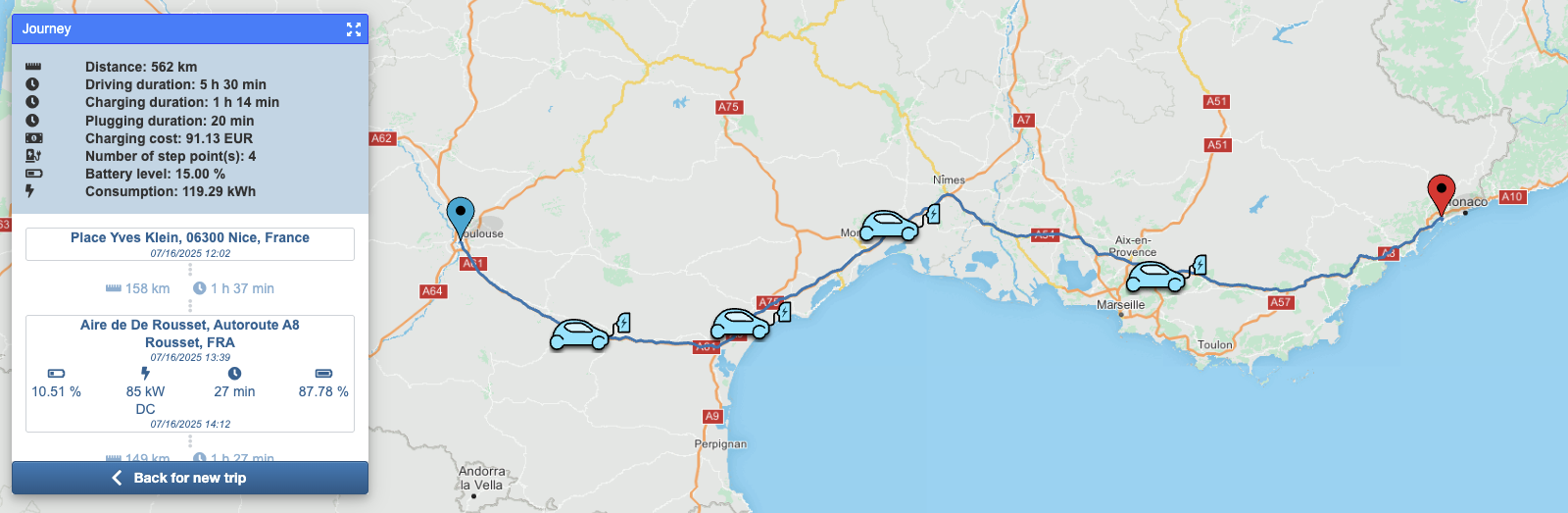
This tutorial explains how to perform a simple electric vehicle route calculation using the EV Smart Routing API.
If your vehicle's battery can't reach the final destination, the route returned will include charging stations (also called step points) automatically.
We’ll calculate a trip from Paris to Lyon.
- 🔑 How to get the vehicle key
- Get the vehicle brand
- Get the vehicle key ID
- 📍 Optional: Convert address to coordinates
- 🚗 Run the EV Smart Routing trip computation
- 📊 Use the results
To compute a route for an electric vehicle, the API needs a vehicle key ID, which identifies the EV model. To get it:
Call the API /getbrands to list all available vehicle brands.
GET ${HOST_URL}/bgis/service/vehicle/1.0/getbrandsResponse (truncated):
{"bemap":{"language":"json"}}
{
  "brands": [{
      "id": "609a4642c9cb5b0b1846c0d4",
      "label": "Aiways"
    }, {
      "id": "609a4642c9cb5b0b1846c0d7",
      "label": "Audi"
    }, {
      "id": "609a4642c9cb5b0b1846c0e6",
      "label": "BMW"
    },
    . . .
  ]
}
See more details on API reference.
In the response you obtain a JSON object with a brands field. This field is an array of brand objects.
The brand object contains two important fields, id and label. The label represents the constructor name. The id is the unique identifier of the entry.
For example the label can be used to fill a drop-down list or to perform a search based on the brand name.
After the brand name is selected, store the id. This id will be used in the next step to get the vehicle key id.
For example the id of brand Audi is 609a4642c9cb5b0b1846c0d7.
⚠️ Important: The id is unique only for on one environment (production, preproduction, etc). When your application switches environments (for example from preproduction to production), you will need to call the API again.
To compute the trip, the EV Smart Routing API needs to know which vehicle to use. The vehicle is represented by an identifier, the vehicle key id. This identifier is an simple string like eb72114c-1f74-4854-b4ce-c2b3f06405d5 for an Audi e-Tron 50 Quattro.
NOTE: The
vehicle key idis the same on all environments (production and preproduction).
To do this selection we have two main APIs:
- A helper API to fill a drop-down list. See the chapter
Select the vehicle by drop listbelow. - An API to find or list the vehicles. See the
Find vehiclechapter below.
The vehicle key ID is a unique string used to identify a vehicle model.
🛑 Note: It is the same across all environments (production, preproduction, etc).
{"bemap":{"language":"request"}}
GET ${HOST_URL}/bgis/service/vehicle/1.0/getlevelvehicleinfo?level=NAME&brandId=609a4642c9cb5b0b1846c0d7
The response is a JSON array.
{"bemap":{"language":"json"}}
["Q4 e-tron 35", "Q4 e-tron 40", "R8 e-tron", "e-tron 50 Quattro", ...]
You can use it to fill a drop-down list in your user interface. Get the searched vehicle name to fill the next step request url and the final find vehicle request.
The battery name is the public or commercial name of battery like "50". This information should not be confused with the actual battery capacity (kWh). For example, a battery with 52 kWh of capacity is called "50".
{"bemap":{"language":"request"}}
GET ${HOST_URL}/bgis/service/vehicle/1.0/getlevelvehicleinfo?level=BATTERY_NAME&brandId=609a4642c9cb5b0b1846c0d7&name=e-tron+50+Quattro
The response is a JSON array.
{"bemap":{"language":"json"}}
["64.7"]
You can use it to fill a drop-down list in your user interface. Get the searched battery name to fill the next step request url and the final find vehicle request.
a. List of DC chargers
{"bemap":{"language":"request"}}
GET ${HOST_URL}/bgis/service/vehicle/1.0/getlevelvehicleinfo?level=CHARGE_POWER_DC&brandId=609a4642c9cb5b0b1846c0d7&name=e-tron+50+Quattro&batteryName=64.7
The response is a JSON array.
{"bemap":{"language":"json"}}
["120.0"]
You can use it to fill a drop-down list in your user interface. Get the searched DC charge to fill the next step request url and the final find vehicle request.
b. List of AC chargers
{"bemap":{"language":"request"}}
GET ${HOST_URL}/bgis/service/vehicle/1.0/getlevelvehicleinfo?level=CHARGE_POWER_AC&brandId=609a4642c9cb5b0b1846c0d7&name=e-tron+50+Quattro&batteryName=64.7&chargerPowerDC=120.0
The response is a JSON array.
{"bemap":{"language":"json"}}
["120.0"]
You can use it to fill a drop-down list in your user interface. Get the searched AC charge to fill the final find vehicle request.
Now, we have all the elements to perform a request with the find vehicle API. See the next chapter.
🔗 See more details in the API reference.
This API lets you retrieve the vehicle key id (needed for trip computation) and detailed vehicle information.
You can:
- 🧩 Get a single vehicle if all required details are known.
- 📋 Get a list of vehicles for a specific brand.
Request:
{"bemap":{"language":"json"}}
{
    "brandId": "609a4642c9cb5b0b1846c0d7",
    "name": "e-tron 50 Quattro",
    "batteryName": "64.7",
    "chargerPowerDC": 120.0,
    "chargerPowerAC": 11.0,
    "enableDatasheet": false
}
Response:
{"bemap":{"language":"json"}}
{
    "vehicles": [
        {
            "key": "eb72114c-1f74-4854-b4ce-c2b3f06405d5",
            "brandId": "609a4642c9cb5b0b1846c0d7",
            "brandName": "Audi",
            "name": "e-tron 50 Quattro",
            "year": "2020",
            "motorType": "EV",
            "batteryName": "64.7",
            "connectorTypes": [
                32,
                38,
                48
            ],
            "chargerPowerAcThreePhases": 11.0,
            "chargerPowerDC": 120.0
        }
    ]
}
The vehicle key id is represented by the key field. The value eb72114c-1f74-4854-b4ce-c2b3f06405d5 will be used to run the trip computation in the next chapter.
Here is another example to get all the vehicles for a brand.
Request:
{"bemap":{"language":"request"}}
POST /bgis/service/vehicle/1.0/findvehicles
Payload:
{
  "brandId": "609a4642c9cb5b0b1846c0d7"
}
In the response you will find all vehicles for this particular brand.
See more details in the API reference.
If you already have GPS coordinates for your trip (lat/lon), you can skip this section. Otherwise, use geocoding to convert a postal address to coordinates.
The EV Smart Routing API runs with coordinates (longitude and latitude): if you have a postal address, you need to find the coordinate of this address.
To do this, 2 APIs are available:
- Geocoding
- Auto-complete
This API can take the postal address in categorized fields and returns the coordinate and postal address.
- The
addressfield contains subfields likecountry,cityandstreet. More fields are available. - The
languagefield defines the language in search and response. - The
maximumResultfield defines the maximum results to be returned in the response.
For more details, see the API reference.
Request:
{"bemap":{"language":"request"}}
POST ${HOST_URL}/bgis/service/geocoding/1.0
{
	"address": {
		"country":"France",
		"city": "Paris",
		"street": "villa des pyrénées"
	},
	"searchType": "FUZZY",
	"maximumResult": 2,
	"language": "fr"
}
Response:
{"bemap":{"language":"json"}}
{
    "extent": {
        "minLon": 2.40518,
        "minLat": 48.8533,
        "maxLon": 2.40587,
        "maxLat": 48.85351
    },
    "elements": [
        {
            "boundingBox": {
                "minLon": 2.40518,
                "minLat": 48.8533,
                "maxLon": 2.40587,
                "maxLat": 48.85351
            },
            "coordinate": {
                "lon": 2.40552,
                "lat": 48.85342
            },
            "distanceFromRequest": 0.0,
            "postalAddress": {
                "countryCode": "FRA",
                "country": "France",
                "state": "Île-de-France",
                "county": "Paris",
                "city": "Paris",
                "district": "Paris 20e Arrondissement",
                "postalCode": "75020",
                "street": "Villa des Pyrénées",
                "streetNumber": "1"
            },
            "postalAddressClassType": "ROAD_FOURTH",
            "postalAddressClassId": 4048,
            "postalAddressExactStreeNumber": false,
            "angle": 62.0,
            "administrativeSpeedLimit": 0.0,
            "relevanceScore": 1.0,
            "countryRelevanceScore": 1.0,
            "cityRelevanceScore": 1.0,
            "postalCodeRelevanceScore": 1.0,
            "streetRelevanceScore": 1.0,
            "streetNumberRelevanceScore": 1.0,
            "segmentId": 0
        }
    ],
    "maximumResult": 1
}
In the elements array, the first element is the best match found by the API.
You can take the longitude and latitude values of the coordinate field of the first element.
This coordinate will be used by the EV Smart Routing API to perform the trip computation.
See more details in the API reference.
This API can take the postal address, place or POI name as free text and returns the place name and the coordinate.
The place field defines the postal address, place or POI name.
The coordinate field is used to select the continent (Europe, North America, Asia, etc.).
⚠️ IMPORTANT: this feature is only available with providers
herehlp,nominatimandaddok.
Request:
{"bemap":{"language":"request"}}
POST ${HOST_URL}/bgis/service/geocoding/autocomplete/1.0
{
    "geoserver": "herehlp",
    "coordinate": {
        "longitude": 2.3412,
        "latitude": 48.85692999999998
    },
    "place": "lyon"
}
Response:
{"bemap":{"language":"json"}}
{
    "items": [
        {
            "elemType": "locality",
            "place": "Lyon, Auvergne-Rhône-Alpes, France",
            "addressLabel": "Lyon, Auvergne-Rhône-Alpes, France",
            "coordinate": {
                "longitude": 4.82965,
                "latitude": 45.75917
            },
            "distance": 392185
        },
        {
            "elemType": "street",
            "place": "Rue de Lyon, 75012 Paris, France",
            "addressLabel": "Rue de Lyon, 75012 Paris, France",
            "coordinate": {
                "longitude": 2.37095,
                "latitude": 48.84927
            },
            "distance": 2337
        },
        ...
    ]
}
In the items array, the first item is the best match found by the API.
You can take the longitude and latitude values of the coordinate field of the first item.
This coordinate will be used by the EV Smart Routing API to perform the trip computation.
See more details in the API reference.
The API EV Smart Routing is used to perform the trip computation. The example trip is from Paris to Lyon. To make this trip computation with the API, some fields are required:
vehicle: this field can be set with the value ofvehicle key idretrieved above in this tutorial in the chapterHow to get the vehicle key.startLonandstartLat: these fields can be set with GPS-like coordinates. If you have a postal address, see the chapterHow to convert a postal address to coordinatesavailable above in this tutorial.stopLonandstopLat: these fields can be set with GPS-like coordinates. If you have a postal address, see the chapterHow to convert a postal address to coordinatesavailable above in this tutorial.temperature: this field can be set with an outside temperature in degrees Celsius. If you don't have this value, you can set it to20.
Now we have all required values to start the computation.
Request:
{"bemap":{"language":"request"}}
POST ${HOST_URL}/bgis/service/evsmartrouting/1.0
{
  "vehicle": "eb72114c-1f74-4854-b4ce-c2b3f06405d5",
  "temperature": 20,
  "startLon": 2.3414,
  "startLat": 48.85717,
  "stopLon": 4.82965,
  "stopLat": 45.75917
}
📌 Some optional fields:
geoserver: allows you to define thegeoserver. Thegeoserverdefines the server configuration to use for the calculation. For examplehereis a configuration running with the HERE map data.algo: the algorithm used to perform the trip computation.csps: the charging station providers to be used during the trip.initBatLvl: the initial battery level in percent. This value will be used from the start coordinate to the destination or to the first charge (if required).minBatLvl: the minimal battery level in percent. Defines the value below which the battery should be charged during the trip.minArrivalBatLvl: the minimal arrival battery level in percent. Defines the value below which the battery should be charged at arrival of trip.extraPayload: defines the payload.cur: the currency as a 3-digit ISO code.departureTime: the departure time as EPOCH in milliseconds.stepPointPluggingTime: the time to take the cable, plug and unplug the connector.plandepl: if theplfield is set totrue, the geometry of the route is returned as aJSONobject composed by longitude and latitude fields. This is very verbose. To reduce this information, you can set theplfield tofalseand set theeplfield totrue. Then, the returned geometry will be a Google Encoded Polyline.
See more details in the API reference.
Request:
{"bemap":{"language":"request"}}
POST ${HOST_URL}/bgis/service/evsmartrouting/1.0
{
  "geoserver": "here",
  "algo": "v3",
  "csps": [
    "benomad"
  ],
  "vehicle": "eb72114c-1f74-4854-b4ce-c2b3f06405d5",
  "initBatLvl": 100,
  "minBatLvl": 10,
  "minArrivalBatLvl": 15,
  "temperature": 20,
  "extraPayload": 75,
  "startLon": 2.3414,
  "startLat": 48.85717,
  "stopLon": 4.82965,
  "stopLat": 45.75917,
  "pl": false,
  "epl": true,
  "cur": "EUR",
  "departureTime": 1675444140000,
  "stepPointPluggingTime": 300
}
Response:
{"bemap":{"language":"json"}}
{
  "logTag": "c6766967-2360-4074-9633-6b82d6f06b9c",
  "journey": {
    "distance": 467750,
    "duration": 18155,
    "batteryLevel": 15,
    "consumed": 104.48,
    "chargingTime": 1661,
    "departureTime": 1675444140000,
    "arrivalTime": 1675463956000,
    "vehicle": "e-tron 50 Quattro",
    "savedCo2Emissions": 0
  },
  "inputInfo": {
    "start": {
      "address": "Pont Neuf, 75001 Paris, France",
      "lon": 2.3413990156969615,
      "lat": 48.85717
    },
    "stop": {
      "address": "Place Antonin Gourju, 69002 Lyon, France",
      "lon": 4.8296482489665165,
      "lat": 45.75917
    }
  },
  "boundingBox": {
    "minLon": 2.3059,
    "minLat": 45.75149,
    "maxLon": 4.91991,
    "maxLat": 48.85848
  },
  "route": {
    "stepPoints": [
      {
        "id": "43032",
        "brand": "IONITY",
        "nameOfPool": "IONITY Aire de la Réserve",
        "accessibility": "NA",
        "availabilityStatus": "IN_SERVICE",
        "longitude": 3.197267,
        "latitude": 47.974493,
        "distance": 131170,
        "duration": 5490,
        "arrivalTime": 1675453230000,
        "departureTime": 1675453882000,
        "consumed": 29.243336564137937,
        "arrivalBatteryLevel": 58.812202022340934,
        "departureBatteryLevel": 69.98247794117722,
        "chargingPower": {
          "currentType": "DC",
          "power": 120,
          "cnnTypeId": 38
        },
        "chargingTime": 352,
        "countryCode": "FRA",
        "country": "Frankreich",
        "postalCode": "89116",
        "city": "Précy-sur-Vrin",
        "street": "A6",
        "open24x7": false,
        "comment": "Recharge jusqu'à 350KW - CCS",
        "chargingStations": [
          {
            "id": "43032-Station1",
            "availabilityStatus": "IN_SERVICE",
            "bookable": false,
            "chargingPoints": [
              {
                "id": "1",
                "availabilityStatus": "IN_SERVICE",
                "type": 38,
                "connectorTypes": [
                  {
                    "id": 38,
                    "key": "TYPE_2-CABLE_COMBO_CCS",
                    "deprecated": false,
                    "name": "Type 2 Combo",
                    "norm": "Combo Type 2 based, DC",
                    "maxPower": 350,
                    "acSingle": false,
                    "acThree": false,
                    "dc": true,
                    "cable": true
                  }
                ],
                "currentType": "DC",
                "power": 350
              }
            ]
          }
        ],
        "theoreticalOptimalSpeed": 0
      },
      {
        "id": "66352",
        "brand": "Electra",
        "nameOfPool": "greet hotel",
        "accessibility": "NA",
        "availabilityStatus": "IN_SERVICE",
        "longitude": 4.851663,
        "latitude": 47.009289,
        "distance": 184784,
        "duration": 6279,
        "arrivalTime": 1675460161000,
        "departureTime": 1675461770000,
        "consumed": 42.587559338235835,
        "arrivalBatteryLevel": 9.99999999999998,
        "departureBatteryLevel": 60.98900904734302,
        "chargingPower": {
          "currentType": "DC",
          "power": 120,
          "cnnTypeId": 38
        },
        "chargingTime": 1309,
        "country": "Frankreich",
        "postalCode": "21200",
        "city": "Beaune",
        "street": "Route de Verdun 58",
        "chargingStations": [
          {
            "id": "66352-Station1",
            "availabilityStatus": "IN_SERVICE",
            "bookable": false,
            "chargingPoints": [
              {
                "id": "1",
                "availabilityStatus": "IN_SERVICE",
                "type": 38,
                "connectorTypes": [
                  {
                    "id": 38,
                    "key": "TYPE_2-CABLE_COMBO_CCS",
                    "deprecated": false,
                    "name": "Type 2 Combo",
                    "norm": "Combo Type 2 based, DC",
                    "maxPower": 350,
                    "acSingle": false,
                    "acThree": false,
                    "dc": true,
                    "cable": true
                  }
                ],
                "currentType": "DC",
                "power": 300
              }
            ]
          }
        ],
        "theoreticalOptimalSpeed": 0
      }
    ],
    "encodedPolyline": "ileiHwhhMGEg@a@YUu@g@_BmET..."
  }
}
See more details in the API reference.
The API returns a JSON object with two main fields: journey and route. The journey contains the summary information of the trip. The route lists the charge steps in the stepPoints field and contains the route geometry in the encodedPolyline field.
The journey object can be used to display the summary of trip in your application: the distance (distance), duration (duration), time spent in charge (chargingTime), arrival date and time (arrivalTime) and consumption (consumed). See the API reference for more details about these fields.
The trip geometry can be used to display the trip on a map in your application. Two fields are available for the geometry. One is the polyline, which contains an array of coordinate objects with lon (longitude) and lat (latitude) fields. The second is encodedPolyline, which represents the geometry as a Google Encoded Polyline.
You can use the interactive example.